
Dashboard essentials for Smarty users




The Smarty dashboard is your central hub for managing address verification, geocoding, and property data services. Whether you're just starting or looking to optimize your current setup, understanding the dashboard's full capabilities can significantly streamline your address data operations.
We recently held a webinar in which we reviewed all of the Smarty dashboard's items and features. Missed it? That's OK; we've got all the information right here. You can expect to read about:
- Accessing your dashboard
- Setting up your account for success
- Understanding your active subscriptions
- Managing API keys effectively
- Streamlining billing and financial management
- Staying informed with smart notifications
- Team management and access controls
- Web tools
- Making the most of free trials
- Key takeaways
Let’s get going!
Accessing your dashboard
Getting to your dashboard is straightforward. Simply navigate to smarty.com/login or click the login icon in the upper right corner of the main Smarty website.
Once logged in, you'll find yourself at the heart of your Smarty experience.
Setting up your account for success
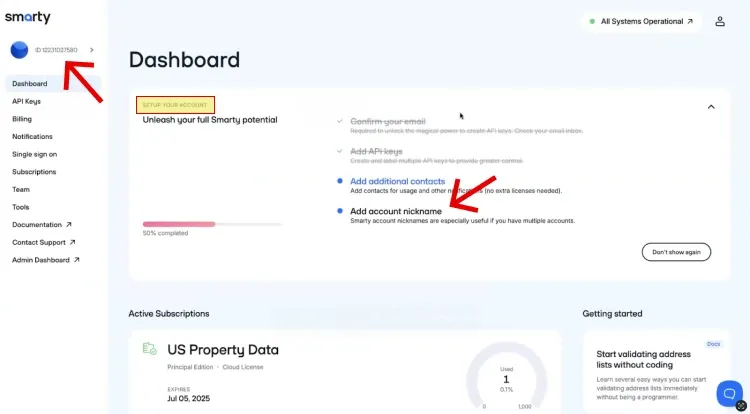
The first step in maximizing your Smarty experience involves properly configuring your account. This includes basic setup items like confirming your email address, setting up additional contacts for important notifications, and creating account nicknames if you manage multiple accounts.
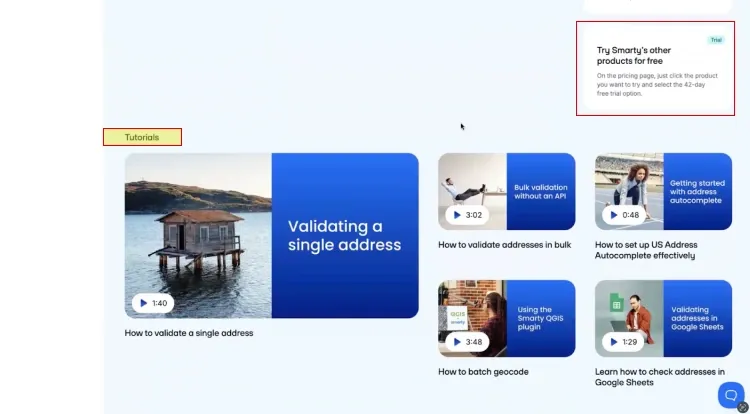
The main dashboard also provides helpful getting-started resources, including introductory tutorial videos that teach users how to begin using address verification tools immediately through platforms like Google Sheets and Excel.
Understanding your active subscriptions
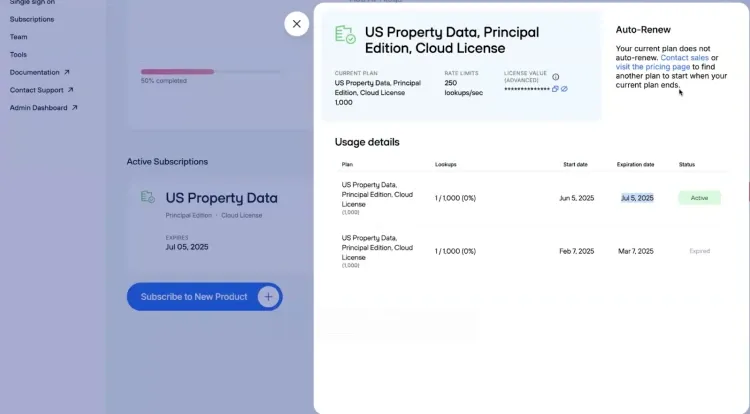
Your dashboard displays all active subscriptions with detailed information about each plan.
You can view your current usage percentage, lookups per second allowance, license details, and subscription status.
For paid subscriptions, auto-renewal options are available, ensuring uninterrupted service without manual intervention from account executives or online purchases.
Managing API keys effectively
The “API Keys” section houses two distinct credential types: embedded and secret keys.
Secret keys are designed for server-side applications and backend systems where they remain hidden from end users. They are used for internal processes, batch operations, and secure API calls. Since they're stored securely on your servers and never exposed publicly, they offer a higher security level.
Embedded keys are intended for client-side applications, like websites or mobile apps, where they may be visible in frontend code. Because they’re necessarily exposed in user-facing environments, these keys require whitelisting of specific IP addresses or domains. This restriction helps limit potential misuse if the key is ever compromised.
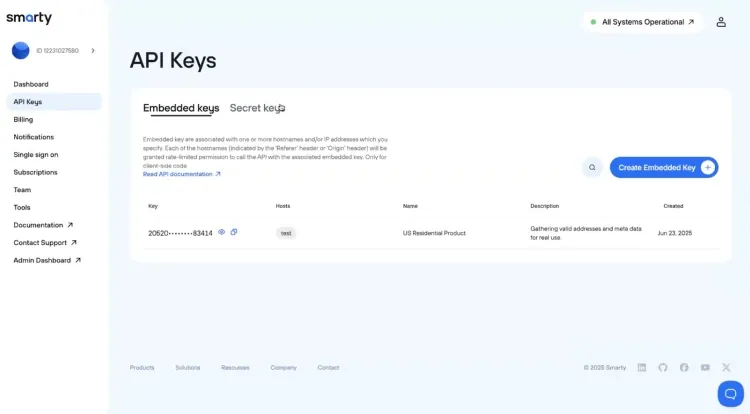
When creating embedded keys, you must authorize specific host IP addresses or domains to access the Smarty services. This security measure ensures that only approved sources can utilize your API credentials.
Streamlining billing and financial management
The billing section allows you to enter taxable address information and store credit card details for automatic renewals. Your order history provides comprehensive receipts showing general account information, order approval dates, and detailed cost breakdowns.
An important note: receipts appear when plans go live, but actual payment processing is confirmed in a separate section of the receipt.
Staying informed with smart notifications
The notifications feature helps you monitor subscription usage proactively. You can set alerts at various usage thresholds (25%, 50%, 70%, etc.) across all of your subscriptions. This is especially valuable for customer-facing applications where address verification is critical to the checkout process.
If you want to make sure you're aware of the status without logging in every day, sign up for threshold emails.
Team management and access controls
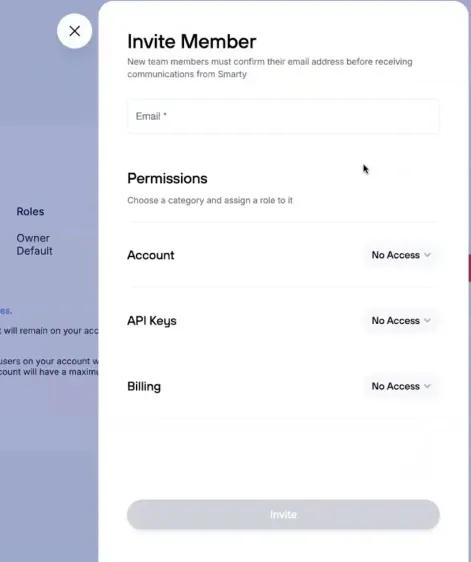
The “Team” section distinguishes between team members and contacts. Team members can log into the account and have varying degrees of power to make changes to the account itself. Team members also receive notifications.
(Contacts, on the other hand, only receive email notifications about certain aspects of the account without login privileges.)
You can assign granular permissions to team members across three categories:
- Account access: Ownership of the account, including dashboard information, notifications, API keys, billing information, and subscription details
- API keys: Creating, editing, and viewing development credentials
- Billing: Financial information and billing notifications
Each permission level offers view-only or full edit capabilities, allowing precise control over what team members can access and modify.
Web tools
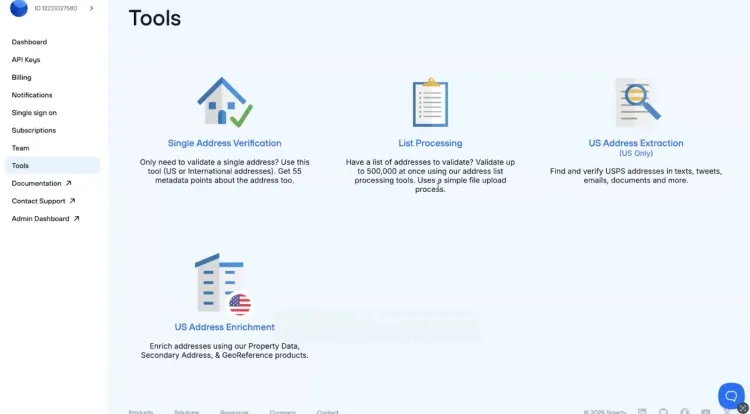
The “Tools” page offers access to Smarty's capabilities without requiring programming expertise or setting up an API.
You can perform single address verification, process bulk address lists, extract address data, and access property enrichment data directly through the web interface. These tools provide the exact same responses that developers receive through API calls, just in a more user-friendly format.
Making the most of free trials
New users can access 1,000 free lookups (valid for 42 days), which is perfect for testing to see if address verification will answer the ultimate question about life, the universe, and everything. These trial lookups work across the tools section, allowing you to experience the full functionality before committing to a paid plan.
Free trials are available for geocoding, autocomplete, and other Smarty products as well.
Key takeaways
The Smarty dashboard transforms complex address data operations into manageable, user-friendly processes. From API key management to bulk processing tools, every feature is designed to help you implement top-notch address verification regardless of your technical background.
Would you like to view the entire webinar? You can do so here: