
Usage notifications | Get notified before hitting your lookup limit




Burning the end of a brisket can lead to some tasty results (we’re looking at you, burnt ends), but unexpectedly burning through your lookups? Not so appetizing.
All users receive notifications when their API usage reaches 90% and 100%.
To help users further leverage their lookups, Smarty’s cooked up a solution: the ability to get notification emails when usage reaches three additional intervals: 25%, 50%, and 70%.
With these notifications working alongside usage by key and limit by key, you can manage your API usage better.
| Score fast and accurate address verification APIs | Increase form completions for any address | Convert addresses into exact coordinates | Make property decisions for US addresses |
| US Address Verification | US Address Autocomplete | US Rooftop Geocoding | US Property Data |
We’re here to answer all your burning (pun intended 😆) address lookup usage questions:
- What are usage notification emails?
- How do I enable usage notifications?
- Can I limit API usage by key?
- Conclusion
What are usage notification emails?
Organizations face several issues when managing API usage. It can be difficult to track specific key usage, identify which keys call which Smarty license, and control lookup consumption, especially if multiple users have access to an API. Usage notification emails help solve these problems.
After 90% and 100% of an account’s lookups for any Smarty product have been exhausted or expired, Smarty will send a notification email to every user on the account.
Users can also receive notification emails when usage reaches 25%, 50%, or 70%. Here’s what to expect:
Subject: Smarty - You've used 50% of your lookups for US Rooftop Geocoding
Hey Joe,
You've used 50% of your Smarty subscription. Check out the details below.
Plan: US Address Verification, Core Edition, Cloud License, Monthly Term (5,000 lookups, max 25,000 lookups/second rate limit)
Lookups: 5000 (includes any adjustments made to the original plan)
Used: 2500
Remaining: 2500
Gain control of your address lookup usage. You can download a report of your usage or try Smarty's new “Limit by Key” feature from your dashboard. This allows you to control how much each API key can use. Learn more here: https://www.smarty.com/docs/key-management
If you have questions, please contact us.
Have a great day,
The Smarty Team
Usage notifications at 25%, 50%, or 70% are set at the account level, meaning every user has a better view into their usage. Plus, each account can opt in to any combination of these new notifications, or stick to just the default 90% and 100% usage notifications.
How do I enable usage notifications?
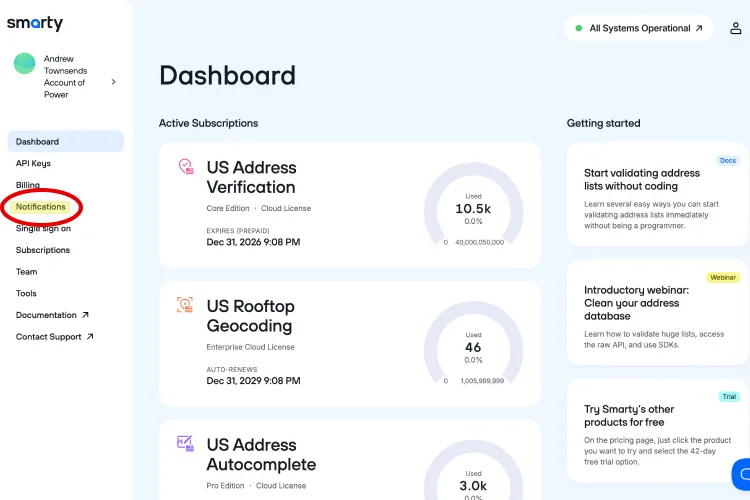
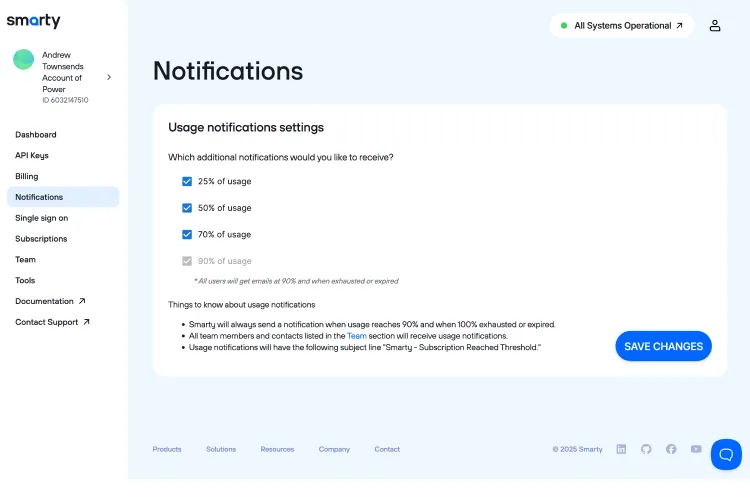
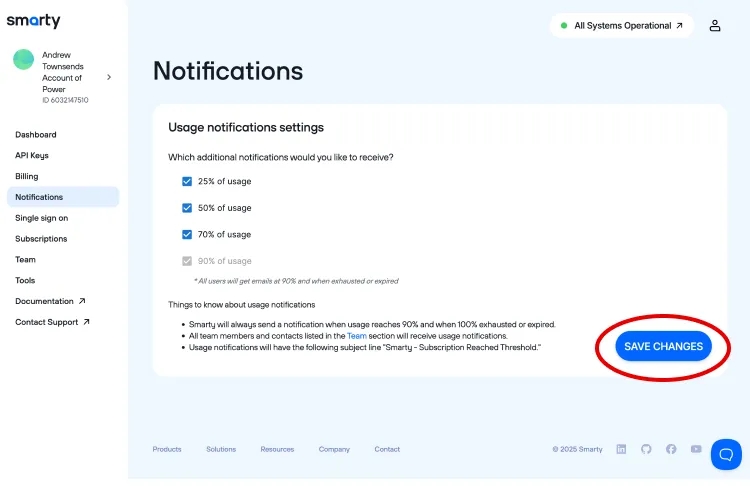
You can manually enable usage notifications from your Smarty Account Dashboard in 3 simple steps:
1. Select “Notifications” from the sidebar.
2. Select the usage notifications you would like to receive.
3. Click “Save Changes”.
You’re done (in less time than it takes to reheat leftover barbecue! 🤣). Better yet, after you sign up for these notifications, you won't be enrolled in any additional marketing emails.
Can I limit API usage by key?
While usage notification emails will keep you up to date on your API usage, they won’t prevent runaway code or team members from eating up lookups. To solve this issue, you’ll need to set API usage limits per key.
Limit by key allows account owners to limit the total number of lookups that a specific key can perform. A key that reaches its limit, like a barbecue joint that’s all sold out, closes its kitchen. All requests are denied until the account owner modifies or removes the limit.
Key usage can be further monitored through usage by key reports. These provide real-time usage data per key and license. They identify which keys consume the most lookups, as well as which keys are using which license, to help users determine whether a key requires limit adjustments.
If you’re ready to level up your API management with limit by key and usage by key, check out our key management setup guide. With these tools, you’ll have access to the control and visibility you need in no time!
Conclusion
Usage notifications are just a hop, skip, and a visit to your Smarty Account Dashboard away. With three clicks, you’ll be able to track your lookup usage without worrying about clutter flooding your inbox.
When these notifications are paired with usage by key and limit per key, you’ll be able to prevent unexpected overages, optimize API costs, and allocate budgets like a pro…or a pitmaster! 😉